


Cherry: The Smarter Way to Pay
4.550.00 Reviews
App Specs
- Version
- 1.3.0
- Updated On
- License
- Free
- Downloads
- 100,000+
- Developer
- Cherry Technologies, Inc.
- Categories
- Finance
- Platform
- Android
Screenshots
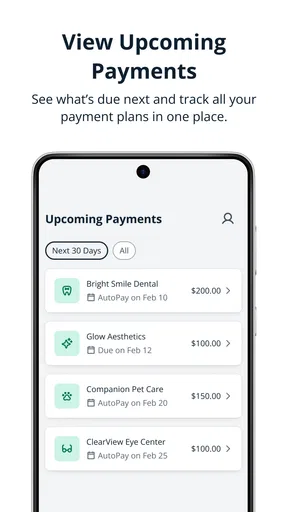
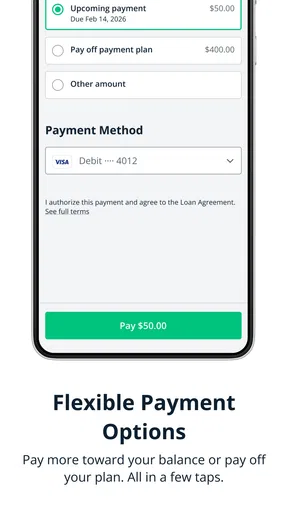
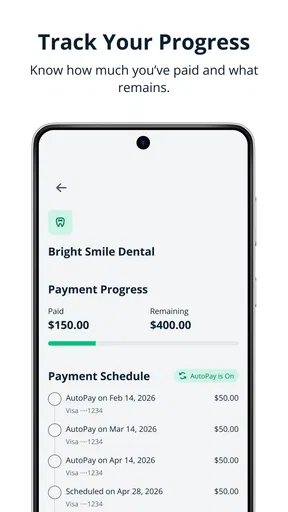
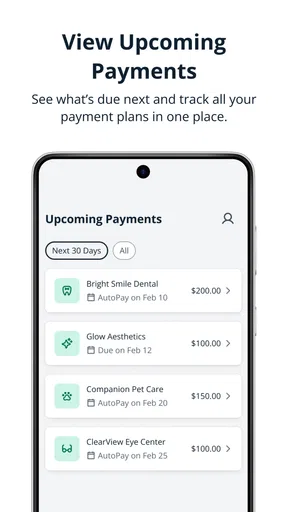
 Analysis by AppCompare
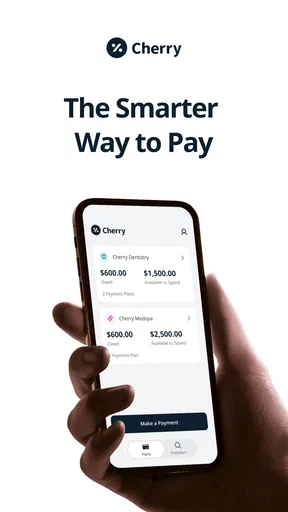
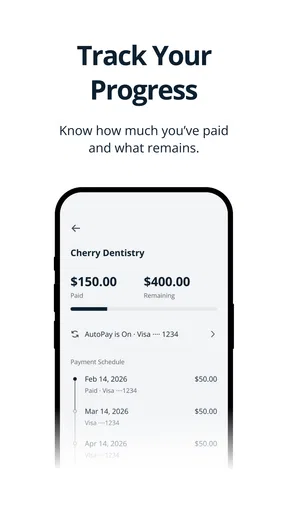
The most useful question I’d ask before installing Cherry is not whether it can replace every financial app on my phone, but whether it can make a particular payment plan easier to manage. The app’s central idea is keeping plans and payment timing in one place. That focus matters: it makes Cherry more relevant to someone trying to stay on top of scheduled payments than to someone simply looking for another way to tap a card at checkout.
I find that distinction helpful because finance apps often blur together. A wallet is mainly about paying; a budgeting app is usually about tracking where money goes; a bank app is tied to one institution. Cherry sits around managing plans and paying on a schedule, so its value depends on whether that is a problem you actually have. If you already know what is due and when, a calendar or your bank’s reminders may be enough. If several plans are easy to lose track of, a dedicated place to manage them could be worthwhile.
What scheduled payments change day to day
When a payment has a schedule, the challenge is not always making the payment itself. It is remembering how it fits alongside rent, utilities, subscriptions, and other commitments. Keeping that plan visible can make it easier to decide what is affordable before the due date arrives. I would use Cherry as a planning aid, not as a reason to spend more or assume that a payment is harmless because it can be made later.
A practical habit is to review upcoming commitments when you get paid, rather than waiting until each bill appears. That gives you a chance to notice a crowded week and adjust discretionary spending early. It is a small routine, but it is more useful than opening a finance app only after something has gone wrong. The key is to treat a schedule as a prompt to plan, not as proof that your overall budget is healthy.
For example, imagine you have a busy week with a utility bill, a planned purchase, and a couple of ordinary household expenses. A payment-planning app can help you look at those obligations together instead of relying on separate reminders and memory. You still need to check your available funds and understand each commitment, but seeing the timing in one workflow may reduce the chance of overlooking a date. That is where I see the practical benefit: fewer mental tabs open, rather than a promise of effortless money management.
Where it fits among finance apps
Cherry is a finance app from Cherry Technologies, Inc. and is free to install. It has a 4.6 average from around 55 ratings, with over 10,000 installs. Those figures suggest that people are finding it, but they are not a substitute for deciding whether its approach suits your own routine. It is rated for Everyone, and version 1.2.1 is listed with Android 7.0 as the minimum operating system.
Compared with a conventional bank app, a focused payment-planning tool can be useful when you want to think across commitments rather than only inspect one account. Compared with a spreadsheet or calendar, an app built around plans may keep the task closer to your regular financial routine. The trade-off is that every extra place where you manage money can create another habit to maintain. If your bank already shows upcoming payments clearly, adding Cherry may not simplify anything unless its plan-management approach genuinely makes the dates easier for you to act on.
Worth Reading Before You Choose

EA SPORTS FC Mobile 26 Is a Bigger Football Game, but It Takes Time

Flipboard Shows What News Apps Must Do Beyond the Feed

Switching to Android Auto Means Rethinking Your Driving Routine

Google Calendar Makes a Crowded Week Easier to Manage

Ludo King Makes the Most of the Minutes Between Plans

Baby Panda World Brings Quick Play to Modern Phones, but Its Game Library Feels Busy
I would also separate planning from payment certainty. Before relying on any scheduled-payment workflow, read the details shown for a plan and make sure you understand the dates and obligations involved. If a payment is important, keep a backup reminder until you have seen how the app fits your routine. That is not a criticism unique to Cherry; it is sensible practice whenever an app becomes part of how you keep track of money.
Who is likely to get the most from it
I can see Cherry being a better fit for someone who has several payment plans to keep straight and wants a dedicated place to review their timing. It may also suit people who prefer a guided app flow over building their own tracking system from scratch. If you tend to forget when a commitment is coming up, pairing the app with a quick weekly review could be more useful than checking it randomly whenever you remember.
It is less compelling for someone who wants a full banking replacement, investment tools, or a highly configurable budget. Those are different jobs, and choosing an app that is strongest at the task you need is usually better than expecting one finance product to do everything. A person who already has a reliable calendar-and-bank routine may also see little reason to add another account or app to manage.
Before making Cherry part of your routine, I’d ask myself three practical questions: Do I have plans whose timing is hard to track? Will I check the app regularly enough for a schedule to help? And does the way it handles those plans match how I prefer to organize my finances? If the answer to the first two is yes, it is worth exploring. If not, a simple reminder may be less work.
Have you ever found yourself juggling multiple payment apps, each promising to simplify your life but somehow only adding to the chaos? Well, let me introduce you to Cherry: The Smarter Way to Pay. I’ve been using this app for a few weeks now, and I’ve got to say, it might just be the payment solution we’ve all been waiting for.
Why Cherry?
Let’s dive into what makes Cherry stand out in a crowded market. First off, the app is designed with user-friendliness in mind. From the moment you open it, you’re greeted with a clean, intuitive interface that makes managing payments feel like a breeze. Trust me, even if you’re not tech-savvy, you’ll find your way around this app in no time.
Features That Shine
One of my favorite features is the ability to link multiple bank accounts and cards. Say goodbye to the days of switching between apps just to pay a single bill. With Cherry, you can manage everything from one central hub. Plus, the app’s security measures are top-notch. They use cutting-edge encryption to protect your data, so you can rest easy knowing your financial information is safe.
Another cool feature is the budgeting tool. It’s like having a financial advisor in your pocket. You can set spending limits, track your expenses, and even get insights into your spending habits. It’s a game-changer for anyone trying to get their finances in order.
How It Works
Getting started with Cherry is as easy as pie. You download the app, sign up, and link your accounts. The app guides you through each step, so there’s no guesswork involved. Once you’re set up, you can start making payments right away. Whether it’s splitting a dinner bill with friends or paying your utility bills, Cherry makes transactions seamless.
One thing I noticed is how quick the transactions are. There’s no waiting around for ages, hoping your payment goes through. Cherry processes payments in the blink of an eye, which is a huge plus in my book.
A Few Things to Keep in Mind
Of course, no app is perfect, and Cherry is no exception. While the app is generally smooth, I did encounter a couple of hiccups. Sometimes, the app would glitch while loading my transaction history. It’s not a deal-breaker, but it’s something to be aware of.
Also, while the app supports a wide range of banks, there are still a few that aren’t integrated yet. If your bank isn’t on the list, you might have to wait a bit before you can link your account.
Lastly, the budgeting tool, while useful, could be a bit more customizable. I’d love to see more options for setting personalized financial goals in future updates.
Making a payment routine dependable
For a scheduled-payment app to help, the information you enter and the habit you build around it both matter. I would start by adding only the plans I genuinely need to monitor, then compare their dates with my existing bills. That first pass can reveal whether the app gives me a clearer picture or merely duplicates reminders I already trust. If it duplicates them, there is no need to force a new routine.
A useful weekly check is to look ahead rather than only review past activity. I’d note which payments are approaching, then compare them with my expected cash flow and leave room for ordinary expenses. This does not require treating the app as a complete budget. In fact, keeping those jobs separate can prevent a common mistake: assuming that a list of payment dates also tells you how much you can safely spend.
For an everyday example, picture someone paid regularly who is coordinating a household bill with a planned purchase. They can use a quiet moment after payday to review the timing, decide what should be set aside, and make a reminder for anything that needs a closer look. The benefit is not that Cherry makes the decision for them; it is that a planned payment is less likely to arrive as a surprise. If income varies, I’d be more cautious and check the schedule against actual available funds each time.
Useful checks before depending on it
One detail I would verify early is whether the bank or card I rely on connects properly. A smooth setup is valuable only if the accounts relevant to my plans are supported. If one is missing, I would avoid building my whole routine around the app and keep that payment visible in the bank’s own tools or a calendar instead. That parallel reminder is a sensible bridge, not an elegant permanent solution, but it protects against a gap while I decide whether Cherry still helps with the other plans.
I would also pay attention to how I interpret the app’s budgeting tools. Spending limits and expense tracking can help me spot patterns, but they are only as useful as the categories and information I review. A limit is a personal guardrail, not a guarantee that every essential expense has been accounted for. For someone trying to save toward a specific goal, a separate note or budget may still be needed if the available customization does not match that goal.
Security deserves the same practical approach. Cherry describes protective measures, but I would still use good account hygiene: choose a strong device passcode, keep the app and operating system current, and avoid checking financial details on a device I do not control. I would also read any account-linking prompts carefully so I understand what I am authorizing. Those steps do not require technical expertise, and they make sense for any app that brings financial information into one place.
When another tool is the better choice
If my main concern is paying one bill from one account, my bank’s own app may be simpler and easier to verify. If I want a visual spending plan with detailed categories and long-term goals, a dedicated budgeting product may be a better match. And if I only need to remember dates, a calendar reminder can do the job without asking me to maintain another finance app. Cherry makes the most sense when its plan-focused workflow solves a recurring problem that those familiar tools leave unresolved.
There is also a personal trade-off in centralizing accounts. Having several payment methods together can reduce app switching, but it can make the central app feel like another important point of access. I would not connect accounts simply because the option exists; I’d start with what I need for the plans I intend to manage. That keeps the setup purposeful and gives me a clearer test of whether the app earns a place in my routine.
Cherry is free, which makes trying its basic approach less of a commitment than paying upfront, but free does not mean there is no cost in time or attention. Setup, account checks, and regular reviews all take effort. I would give the workflow a fair trial through an ordinary payment cycle, then ask whether I’m making fewer last-minute checks and feeling more organized. If not, returning to a bank app and calendar is a perfectly reasonable choice.
Final Thoughts
All in all, Cherry: The Smarter Way to Pay is a solid choice for anyone looking to streamline their payments and get a better handle on their finances. The app’s user-friendly design, security features, and robust functionality make it a standout in the payment app arena.
If you’re tired of juggling multiple apps and need a reliable, all-in-one payment solution, give Cherry a try. It’s not just smarter; it’s a breath of fresh air in the world of mobile payments. And let’s be honest, who doesn’t want to make life just a little bit easier?
Pros
- User-friendly interface with intuitive design.
- Seamless integration with various payment methods.
- Real-time transaction notifications.
- Secure encryption for data protection.
- Supports multiple currencies for global use.
Cons
- Limited customer support options available.
- Occasional app crashes on older devices.
- Requires stable internet for optimal use.
- No offline transaction capability.
- Some features locked behind paywalls.
FAQs for Cherry: The Smarter Way to Pay
What is Cherry: The Smarter Way to Pay?
Cherry is a payment app designed to simplify financial transactions. It allows users to make payments, manage expenses, and track their spending effortlessly. With a user-friendly interface, Cherry integrates with various payment platforms, making it a versatile tool for individuals looking to streamline their financial management.
Is Cherry secure for financial transactions?
Yes, Cherry prioritizes user security by employing advanced encryption technologies and authentication processes. The app ensures that all transactions are secure, giving users peace of mind when managing their finances. Regular updates and security patches further enhance the safety of using Cherry for payments.
Can I link multiple bank accounts to Cherry?
Absolutely. Cherry supports linking multiple bank accounts, allowing users to manage all their finances from a single platform. This feature is particularly useful for those who have accounts with different banks and want a centralized way to keep track of their spending and balances.
Does Cherry charge any fees for transactions?
Cherry is transparent about its fee structure, which may vary based on the type of transaction. While many standard transactions are free, there might be minimal fees for specific services like international transfers. It’s recommended to check the app’s terms and conditions for detailed information on fees.
Is Cherry available for both Android and iOS devices?
Yes, Cherry is available on both Android and iOS platforms. The app is designed to provide a seamless experience across devices, ensuring that users can access their accounts and manage their payments whether they use a smartphone or tablet. Regular updates ensure compatibility with the latest operating systems.


